


Log In to Your U9PLAY Account
How to Login to U9PLAY (Step-by-Step)
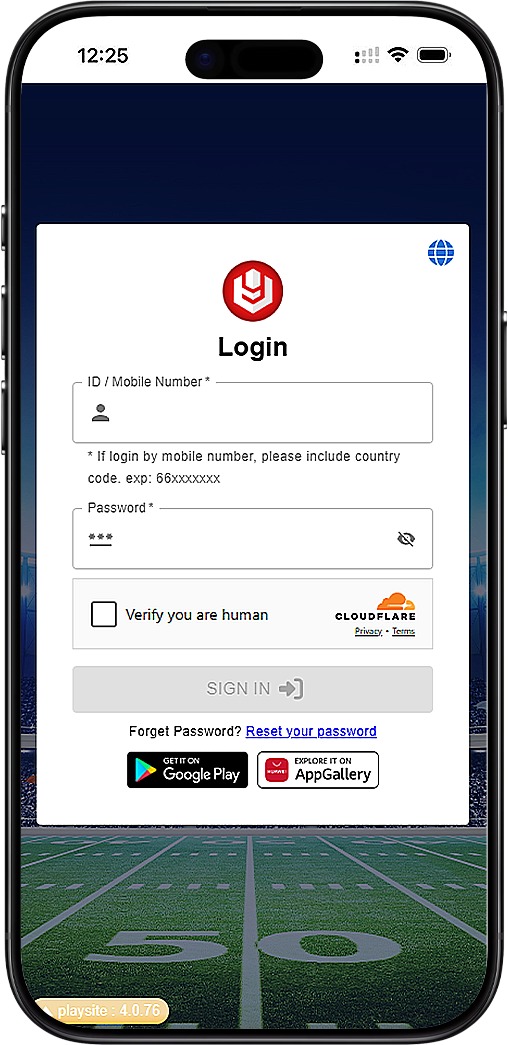
Step 1: Go to the U9PLAY Login Page
Open your browser and navigate to the official U9PLAY login page. The page is accessible from both desktop and mobile devices. Bookmark the page for faster access in the future.
Step 2: Enter Your U9PLAY ID or Mobile Number
In the "ID/Mobile Number" field, enter your U9PLAY User ID or registered mobile number. If you are logging in with a mobile number, remember to include the country code. For example, Malaysia numbers use +60 followed by your mobile number (e.g., +60123456789).
Step 3: Enter Your U9PLAY Password
Type your password in the "Password" field. Passwords are case-sensitive. If you have forgotten your password, click the "Forgot password? Reset your password" link below the login button.
Step 4: Complete Cloudflare Verification
U9PLAY uses Cloudflare to verify that you are a real person and not a bot. Check the box or complete any prompted challenge (e.g., selecting images or clicking "Verify"). This security step protects your U9PLAY account from automated attacks.
Step 5: Click the Login Button
After entering your credentials and completing the Cloudflare check, click the red "Login" button. You will be redirected to your U9PLAY account dashboard. If login fails, double-check your ID/mobile number and password.
U9PLAY Mobile Login Options
Login via Google Play on Android
U9PLAY supports fast login through Google Play on Android devices. If you have the U9PLAY app installed from Google Play, you may be able to log in with your Google account credentials. Check the app settings for linked login options.
Login via AppGallery on Huawei Devices
For Huawei device owners, U9PLAY is available on the AppGallery. Download the official U9PLAY app from AppGallery and log in using your existing U9PLAY ID and password. The app provides the same Cloudflare security verification.
Troubleshooting U9PLAY Login Issues
Forgot Your U9PLAY Password?
Click the "Forgot password? Reset your password" link on the U9PLAY login page. You will be asked to enter your registered mobile number or email. A password reset link or OTP will be sent to your registered contact. Follow the instructions to create a new password.
Incorrect ID or Mobile Number Format
When logging in with a mobile number, always include the country code without the "+" symbol in some cases, or exactly as shown in the example: +60xxxxxxxxx. For U9PLAY Malaysia users, the country code is +60. If you are using your U9PLAY User ID instead, enter it exactly as you created it during registration.
Cloudflare Verification Loop or Failure
If you are stuck in a Cloudflare verification loop, try clearing your browser cache and cookies, or switch to a different browser. Ensure your internet connection is stable. If the problem persists, disable any VPN or proxy that may trigger additional security checks on U9PLAY.
Account Locked or Suspended
After multiple failed login attempts, U9PLAY may temporarily lock your account for security reasons. Wait 15–30 minutes before trying again. If your account remains locked, contact U9PLAY customer support via live chat for assistance.
U9PLAY Login Security Best Practices
Use a Strong, Unique Password
Your U9PLAY password should be at least 8 characters long and include a mix of uppercase letters, lowercase letters, numbers, and symbols. Do not reuse passwords from other websites or online services.
Enable Two-Factor Authentication (If Available)
U9PLAY encourages members to enable additional security features such as two-factor authentication (2FA) through the OTPq app or SMS OTP. This adds an extra layer of protection to your U9PLAY account.
Always Log Out on Shared Devices
If you access U9PLAY from a public computer, shared phone, or friend's device, always click the "Log Out" button after your session. Do not save your password in the browser when using shared devices.
Frequently Asked Questions About U9PLAY Login
Can I login to U9PLAY with my mobile number instead of User ID?
Yes. U9PLAY allows login using either your registered User ID or your mobile number. If using a mobile number, you must include the country code (e.g., +60 for Malaysia) in the correct format.
What should I do if I see "Invalid ID/Mobile Number or Password"?
Double-check your entry for typos. Ensure caps lock is off if your password is case-sensitive. If you have forgotten your password, use the password reset link. If you have forgotten your User ID, contact U9PLAY customer support.
Is the U9PLAY login page safe to use on public Wi-Fi?
It is not recommended to log in to any gaming or financial account on public Wi-Fi networks. If you must use public Wi-Fi, use a trusted VPN service to encrypt your connection. U9PLAY's Cloudflare verification adds security, but network-level risks remain.
Why does U9PLAY use Cloudflare verification?
Cloudflare verification protects U9PLAY and its members from automated bots, DDoS attacks, and brute-force login attempts. This security measure ensures that only real human users can access the U9PLAY platform.
Responsible Gaming at U9PLAY
Login Responsibly – Set Limits
U9PLAY encourages all members to practice responsible gaming. After logging in, you can set daily, weekly, or monthly deposit limits, session time reminders, and self-exclusion periods from your account settings.
Need Help? U9PLAY Support Is Available
If you experience any login issues or have concerns about your gaming habits, U9PLAY customer support is available 24/7 via live chat. Visit the U9PLAY website and click the chat icon in the bottom corner to speak with a support agent.
Ready to Play? Log In to Your U9PLAY Account Now
Access your U9PLAY dashboard instantly. Enter your ID or mobile number with country code, password, and complete Cloudflare verification. Reset forgotten password in just a few clicks.
Login to U9PLAY - Malaysia Login to U9PLAY - Singapore